What are good invoking messages in ChatGPT apps?
We analyzed 886 tools across 147 third-party apps in the ChatGPT App Store and found that 68% of tools have no invoking or invoked message at all. Of the apps themselves, 27% ship every single tool without any status messages. That includes major apps like Monday.com (35 tools), Canva (34 tools), Atlassian Rovo (34 tools), and Stripe (26 tools).
When ChatGPT calls one of your tools, it sends two status messages: one while it's running (invoking) and one when it finishes (invoked). Users only see these messages in developer mode, so they don't appear in the normal chat UI.
Even so, they're part of your app's metadata. They matter for consistency, debugging, and for anyone inspecting tool calls. And if developer mode becomes more widely visible (or if OpenAI surfaces these messages in the future), you'll want them to actually say something useful.
How Invocation Messages Appear
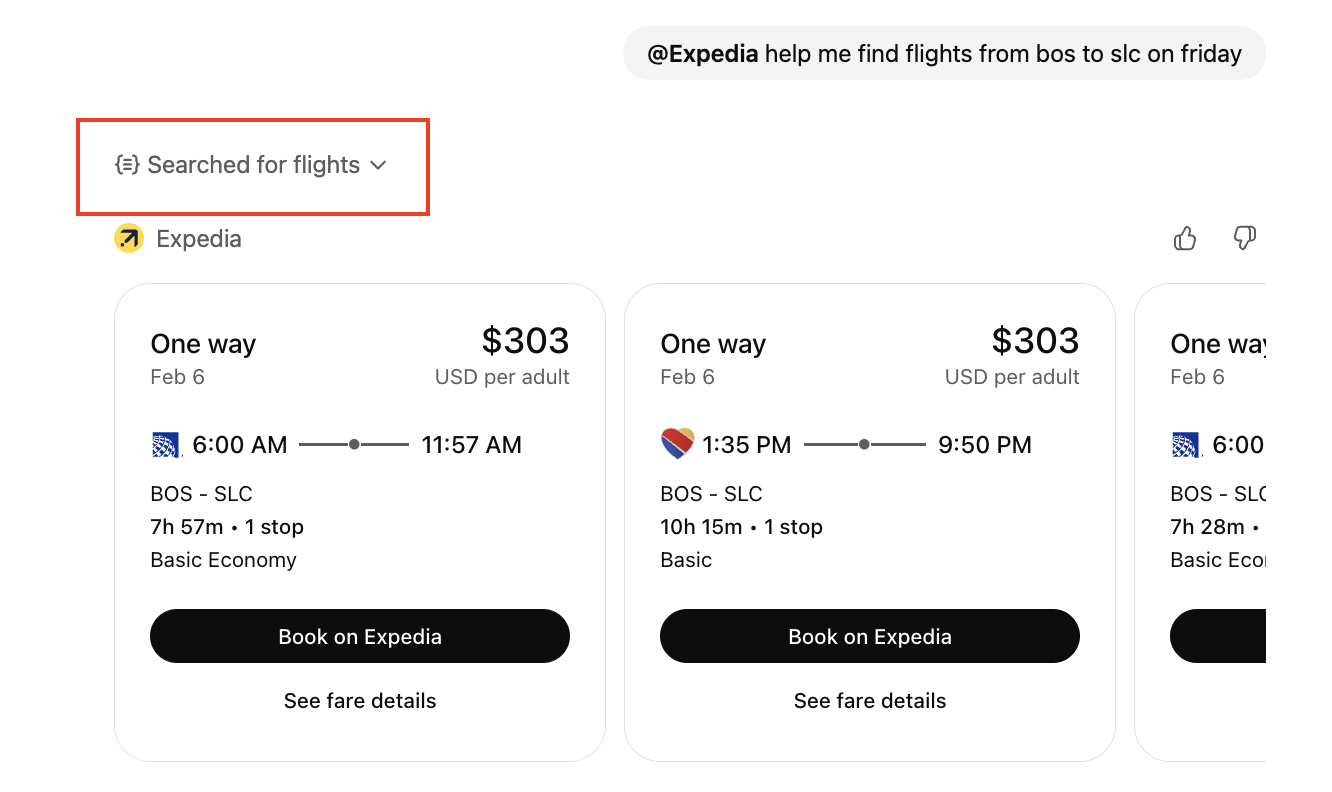
In developer mode, you'll see the invoking and invoked messages appear as ChatGPT runs your tools. Here's what that looks like:
Here's what generic messages look like (composited from real apps):
- Invoking: "Working on it..."
- Invoked: "Done!"
This tells users nothing. Are you searching flights? Checking prices? Loading destinations? "Working on it" could mean anything. And "Done" doesn't communicate what was accomplished.
Compare that to Expedia:
search_flights: "Searching for flights" / "Searched for flights"search_hotels: "Searching for places to stay" / "Searched for places to stay"
Each tool gets its own message, and users know that the action being taken matches their intent.
The Data: 886 Tools, 148 Apps
Here's the full breakdown of message quality across every tool we analyzed:
| Quality Level | Invoking Messages | Invoked Messages |
|---|---|---|
| None (no message set) | 604 (68.2%) | 604 (68.2%) |
| Generic ("Working...", "Done") | 1 (0.1%) | 1 (0.1%) |
| Specific (describes the action) | 276 (31.2%) | 276 (31.2%) |
| Branded (includes brand personality) | 5 (0.6%) | 5 (0.6%) |
The good news: generic messages are nearly nonexistent. When apps bother to set messages, they almost always write something specific. The problem is that most apps don't bother at all.
At the app level, 70 out of 146 apps (48%) have messages on every tool. Another 37 apps (25%) have messages on some tools but not others. The remaining 39 apps (27%) ship with no messages on any tool.
Which Categories Care About Messages?
Message coverage varies dramatically by category:
| Category | Apps | Tools | % With Messages |
|---|---|---|---|
| Entertainment | 3 | 8 | 100% |
| Travel | 13 | 20 | 85% |
| Food | 6 | 17 | 82% |
| Education | 8 | 21 | 81% |
| Lifestyle | 21 | 63 | 75% |
| Shopping | 14 | 52 | 67% |
| Business | 22 | 130 | 40% |
| Design | 5 | 57 | 23% |
| Productivity | 18 | 135 | 22% |
| Finance | 18 | 196 | 12% |
| Developer Tools | 10 | 88 | 8% |
| Collaboration | 4 | 70 | 0% |
The pattern is striking. Consumer-facing categories (travel, food, entertainment, lifestyle) consistently have better coverage than enterprise and developer categories. Every single entertainment app has messages on every tool. Meanwhile, none of the four collaboration apps (Atlassian Rovo, Egnyte, Fireflies, Zoom) have set any messages at all.
Finance is particularly notable: 18 apps and 196 tools, but only 12% coverage. Stripe, Alpaca, Ramp, PitchBook, S&P Global, and Morningstar all ship without any messages.
The Best Example: Clay
Clay, the data enrichment tool, does something clever. Their messages aren't just descriptive, they're on-brand:
- Invoking: "Molding search results..."
- Invoked: "Finished sculpting the search"
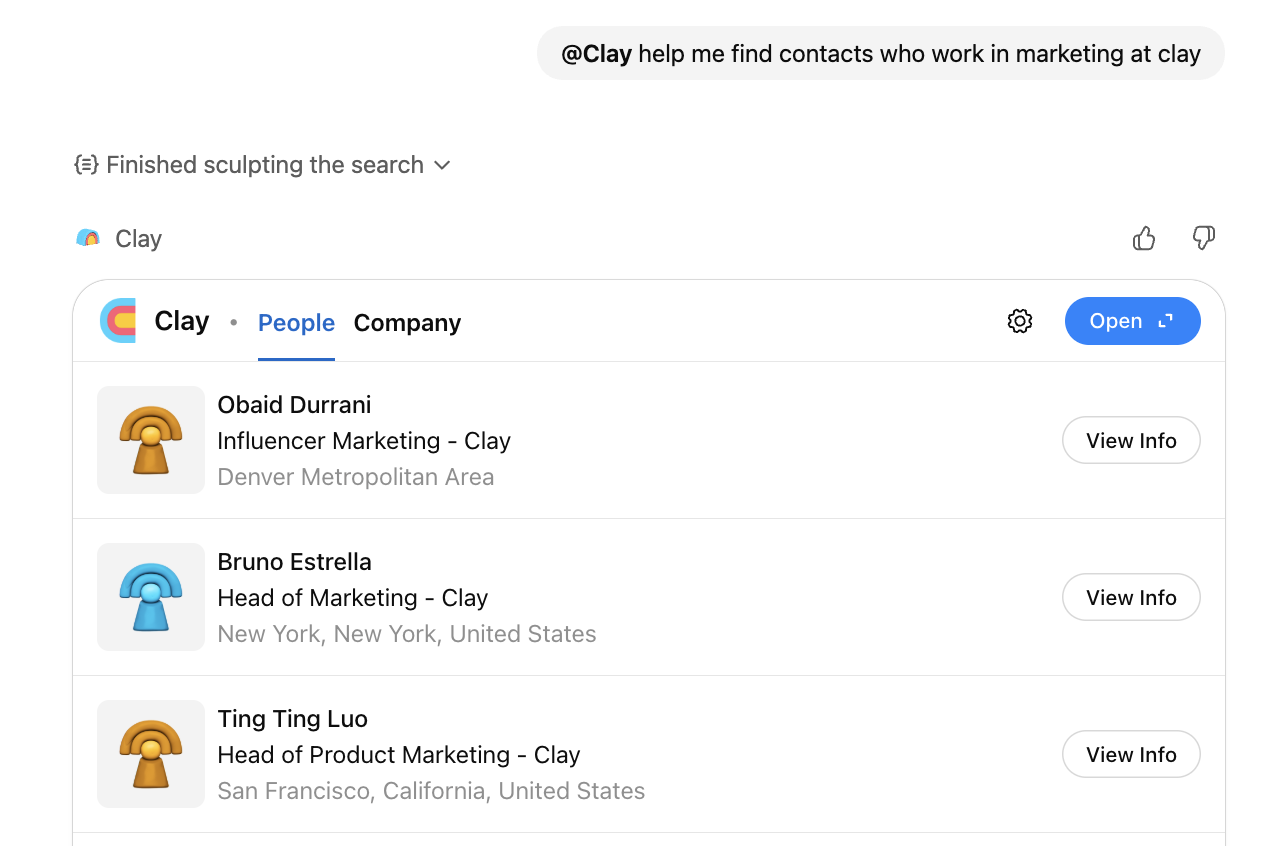
This works because:
- It's specific to what Clay does (search for relevant contacts)
- It plays on the "clay" metaphor in their brand name
- It's memorable without being annoying
Clay is the only app in our dataset that uses branded language in its messages. Out of 886 tools across 147 apps, exactly 5 tools have what we'd call branded messages, and they're all Clay's.
You don't have to be this creative, but it shows what's possible when you put thought into these fields.
Other Apps Doing It Well
DataCamp stands out for writing messages with genuine personality. Instead of dry status updates, they use encouraging language that fits their education brand:
exercise.get_by_id: "Get ready to learn..." / "All set -- show me what you've got!"content.search: "Searching for the good stuff..." / "Results are in -- take a look!"course.get_by_id: "Loading your learning path..." / "Grab your notebook -- it's learning time!"
All six of DataCamp's tools have unique, specific messages. No copy-pasting.
Target nails it with 7 tools, each with a distinct message:
multiCategorySearchItems: "Searching for items in the Target app..." / "Here are items from the Target app"getNearbyStores: "Getting nearby stores" / "Retrieved nearby stores"getItemAttributes: "Fetching item attributes" / "Item attributes retrieved"
Peloton keeps it clean across 4 tools:
search: "Searching Peloton classes..." / "Search completed"create-training-plan: "Building your interactive training plan..." / "Training plan ready! Drag to reorder."
Uber is interesting because it does well on the tool people actually use while phoning it in on internal tooling:
get_estimates_between_two_locations: "Pinning your pickup and dropoff..." / "Pins dropped. Locations ready."publish_analytics_events: "Tool invoking..." / "Tool invoked ready."
That second one is a literal placeholder. It suggests someone set up the analytics tool quickly and never went back to polish it.
Intuit QuickBooks has strong coverage at 10 out of 11 tools, with messages like:
benchmarking_analysis: "Analyzing your numbers against industry benchmarks..." / "Benchmarking analysis completed successfully"profit_and_loss: "Generating your P&L report..." / "P&L report generated successfully"
Malwarebytes writes messages that match the security context perfectly:
reputation.check_link: "Checking link reputation" / "Link reputation checked"reputation.whois: "Looking up domain registration" / "Domain info retrieved"
The Copy-Paste Problem
We found 5 apps that use the exact same message for every tool. This is the clearest sign that someone filled in the fields as a checkbox exercise rather than thinking about the user experience:
| App | Tools | Repeated Invoking Message | Repeated Invoked Message |
|---|---|---|---|
| Clay | 8 | "Molding search results..." | "Finished sculpting the search" |
| invideo | 6 | "Generating your video..." | "Here's your video!" |
| Lovable | 4 | "Building your website..." | (none) |
| LOTTE CHEMICAL | 3 | (Korean: "Asking LOTTE CHEMICAL...") | (Korean: "LOTTE CHEMICAL answered...") |
| ImmoScout24 | 2 | "Searching for properties..." | "Search complete" |
Clay gets a partial pass here because their message is at least creative and on-brand, even if it's the same across all tools. But invideo uses "Generating your video..." for tools that aren't generating videos. Lovable uses "Building your website..." for every action, whether it's creating a new project or checking deployment status.
If you have more than a couple of tools, each one should get its own message. Peloton, Target, and DataCamp show how it's done.
The Partial Coverage Problem
37 apps have messages on some tools but not others. This is probably worse than having no messages at all, because the inconsistency is visible:
- Gusto: 1 out of 40 tools has messages. Just
run_payrollgot the treatment. - Zillow: 4 out of 9 tools have messages.
- Asana: 3 out of 19 tools have messages.
- Figma: 3 out of 7 tools have messages.
- Spotify: 1 out of 6 tools has messages.
- Klaviyo: 4 out of 26 tools have messages.
Gusto is the most extreme case. With 40 tools, only run_payroll has a message ("Loading payroll..." / "Ready to run payroll"). The other 39 tools are blank.
A Simple Framework
For invoking messages:
[Present participle verb] + [what specifically]
- "Searching for flights"
- "Loading your workout schedule..."
- "Checking domain availability..."
- "Building your interactive training plan..."
For invoked messages:
[Result noun] + [ready/found/complete]
- "Searched for flights"
- "Schedule loaded"
- "Domain check complete!"
- "Training plan ready! Drag to reorder."
Or go the Clay route and find something that ties to your brand. Just make sure it still communicates what happened.
What To Do
- Open your MCP server config
- Look at every
openai/toolInvocation/invokingandopenai/toolInvocation/invokedfield - Ask: "If someone in developer mode saw only this message, would they know what my tool is doing?"
- If the answer is no, rewrite it
- Make sure every tool has its own unique message (avoid the copy-paste pattern)
- Check for consistency: if 8 out of 10 tools have messages, the 2 that don't will stand out
While this seems small, great invocation messages are one of the details that separates polished apps from ones that feel half-finished. When 68% of tools across the store have no messages at all, even basic coverage puts you ahead of most of the competition.
Methodology
This analysis covers 147 third-party apps in the ChatGPT App Store as of February 2025. We excluded integrations built and maintained by OpenAI (like GitHub, Linear, Slack, and Google Workspace) to focus on apps that companies built and shipped independently.
Want access to the full dataset? Contact us to learn more.